 URL Toolbox
LINKS & QR CODES
A smoother way
to work with links.
Open batches, collect links, and generate or read QR codes. The everyday browser tasks, together in one place.
 Add to Dia
 Add to Vivaldi
 Add to Brave
20 languagesWork in the language you know
Popup & side panelThe right space for each task
Local processingLink and QR tasks, primarily on device
01 / OPEN IN BATCHES
A set of links. One simple step.
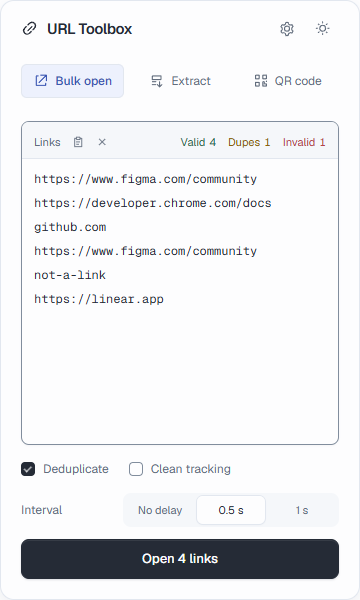
Paste a set of links, organize them, and open what you need. Spend less time moving between documents and the address bar.
- Recognize links, remove duplicates, and optionally clean tracking parameters
- Set the interval between opened tabs
02 / COLLECT & EXPORT
Keep the links. Skip the busywork.
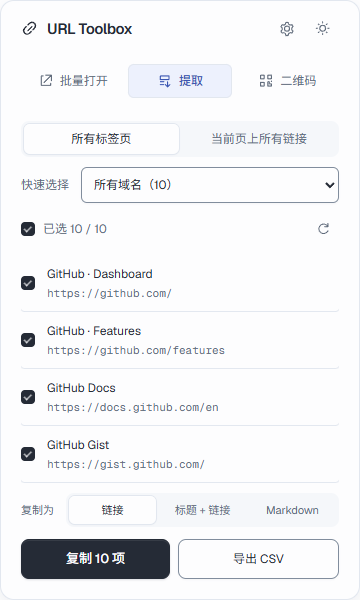
Collect links from tabs or the current page. Select by root domain, and keep up with changes to your tabs.
- Copy URLs, titles with URLs, or Markdown
- Export a CSV for your next step
03 / QR CODES
From links to codes. And back again.
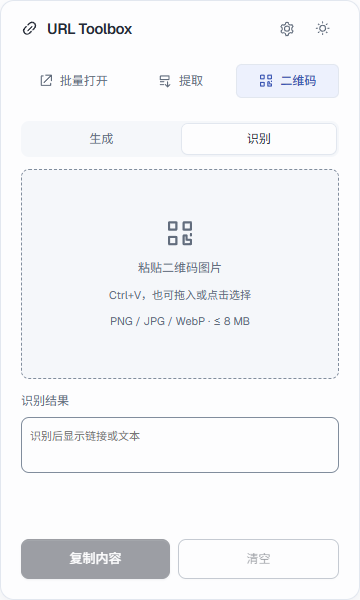
Generate a code for the current page or your own URL. To read an image, choose a file, drag it in, or paste it.
- Copy or download a PNG
- Read a single QR code locally from PNG, JPG, or WebP

Make your next link task easier.
Keep the everyday work in your browser.
 Add to Chrome